
Weekend Sale Special Limited Time 75% Discount Offer - Ends in 0d 00h 00m 00s - Coupon code: discbf75DC

Page: 1 / 2
Total 17 questions
Exam Code: BIM_MGT_101                Update: Oct 10, 2026
Exam Name: Autodesk Certified Professional in BIM Management for Building Design

Autodesk Autodesk Certified Professional in BIM Management for Building Design BIM_MGT_101 Exam Dumps: Updated Questions & Answers (October 2026)

Question # 1

Refer to the exhibit.
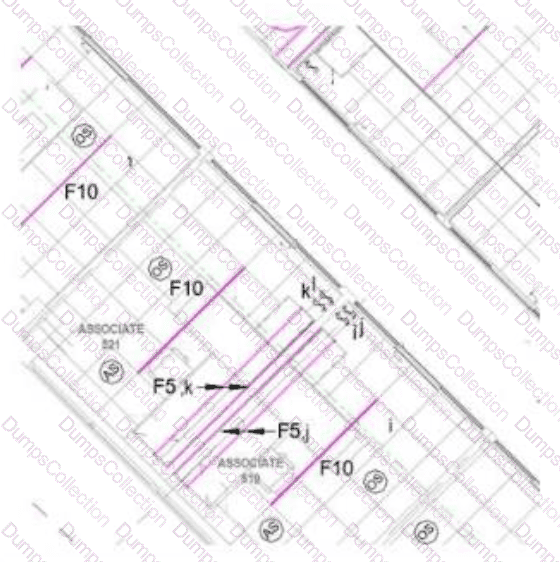
A designer cannot see a 2x4 tile ceiling in the hallway area of their Reflected Ceiling Plan, but that same ceiling is visible in a 3D view. The 2x2 ceilings in the other rooms are visible in both views.

What are two possible reasons for this? (Select two.)

A.

The ceiling was inadvertently deleted.

B.

A View Filter has been applied for that ceiling type.

C.

A View Template has been assigned with ceilings category visibility off.

D.

A Plan Region with a higher cut level has been applied to that area.

E.

Hide in View by Category was applied to that ceiling.

Question # 2

What is included in a BIM Execution Plan?

A.

Project schedule and design playbook.

B.

Modeling standards and technology ecosystem.

C.

LOD Matrix and project specifications.

D.

Collaboration protocols and project playbook.

Question # 3

A Revit model has become very slow for the team immediately after a regularly scheduled file distribution across all disciplines.

What two steps can the BIM manager take to review issues across the connected files? (Select two.)

A.

Flatten all elements in a linked model and reload the link.

B.

Remove all linked files and relink them, reviewing Task Manager during each action.

C.

Open the model using Specify Worksets to validate that the issue is isolated to the updated linked files.

D.

Review and fix all warnings appearing in linked models from consultants.

E.

Check the Manage Links panel for file paths that may be creating access issues for team members.

Question # 4

A project team has been ignoring their model warnings, and from talking with the team, it is apparent that they are intimidated by the number of warnings and unwilling to tackle resolving them.

What steps can the BIM manager take to educate the team and alleviate their reluctance to address these issues?

A.

Show the team how warnings are sorted by type and advise them on how to research and resolve them.

B.

Advise the team to export the warnings list, then bulk delete the elements creating the warnings.

C.

Install a third-party add-in that allows the team to mark all warnings with “ignore.”

D.

Create Autodesk Forma issues for each warning and assign them to specific team members.

Question # 5

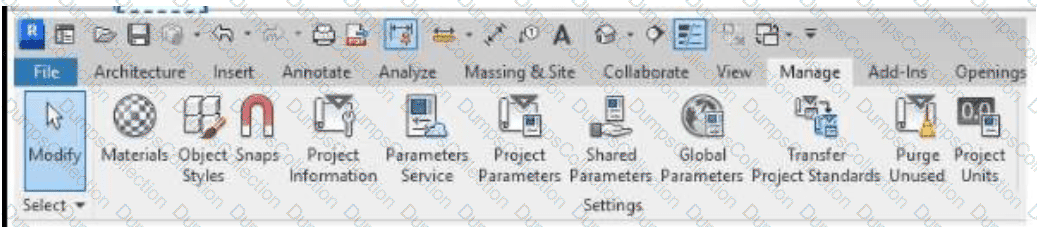
A client has provided a resource model with many custom shared parameters required to meet the project data-management requirements across all of its projects with the firm. The BIM manager has extracted those parameters to the Parameters Service for wider firm access.

Which tool should a team member use to load the new shared parameters into a project model? (Select the correct tool on the image.)
Question # 6

A BIM manager is running clash detection for the first time on a large retail project during the Design Development phase. After copying all the models to the coordination space on Autodesk Forma, the matrix shows no clashes among any of the models.

How should the BIM manager proceed?

A.

Add sheets to the publish settings and rerun the clash.

B.

Verify the shared coordinates for each model and republish.

C.

Continue forward on the project because there are no coordination issues.

D.

Use the project as a case study for a firm-wide presentation.

Question # 7

During a model review, several linked files appear missing or unloadable in the federated coordination file. The files were present and working the day before, and no changes were made to the Revit host model itself.

As the BIM manager, what is the most appropriate step to troubleshoot the issue?

A.

Check that file paths to linked models were set as relative and validate that the folder structure remains unchanged.

B.

Ask the modelling team to rebind all linked models using absolute file paths.

C.

Remove the missing links and advise each team to reinsert their models before the next coordination meeting.

D.

Recreate the host model using a previous backup and manually reload each link.

Question # 8

A federated model has been created for a multidisciplinary project, but clashes are being reported in areas where coordination should already be resolved. Upon investigation, the BIM manager finds that some models were exported with outdated links and local coordinates.

What is the most appropriate next step before proceeding with coordination analysis?

A.

Instruct teams to verify model references and coordinate systems before reassembly.

B.

Freeze the current model state and ask trades to work around the identified issues.

C.

Notify the client and exclude the faulty models from further coordination.

D.

Run an additional clash-detection pass with adjusted tolerance thresholds to reduce clash totals.

Question # 9

A BIM manager is reviewing a consultant’s architectural model before the next coordination milestone. The project requires each model to conform to a defined naming convention, include COBie parameters, and populate shared parameters according to the Model Element Table. The BIM manager notices that several elements are missing metadata and that some naming is inconsistent.

Which step best supports a systematic evaluation of completeness and compliance with project standards?

A.

Manually review each element in the Model Browser to confirm naming and parameter completeness.

B.

Use a model checker or data-validation tool to compare parameter presence, naming conventions, and required values against the established project standard.

C.

Ask the design team to re-export the model with updated information based on verbal clarification and metadata from the BIM Execution Plan.

D.

Filter out incomplete elements in a 3D view and hide them to avoid confusion during coordination.

Question # 10

The BIM manager received a subcontractor’s 3D model containing specialty equipment to be integrated into the federated model. Upon review, they observe that:

    Many elements lack consistent object styles and category assignments.

    Some components are modelled with excessive detail, affecting performance.

    Embedded data does not follow the project’s naming conventions outlined in the BEP.

What is the most appropriate next step when evaluating this geometry and content?

A.

Instruct the subcontractor to simplify geometry and reduce file size, even if some metadata and classifications are lost.

B.

Approve the model as-is to avoid delaying coordination and document the issues for review at the next quality-control milestone.

C.

Review the model against content standards, document noncompliance, and request revisions aligned with agreed deliverable requirements.

D.

Import the model into the coordination environment and apply view filters to hide excessive detail and inconsistencies.

Page: 1 / 2
Total 17 questions

Most Popular Certification Exams

Payment


Contact us

Site Secure

mcafee secure

TESTED 10 Oct 2026