
Which function should a Data Analyst use to average sales at a less-granular level of detail than is in the view?
A Data Analyst plans to create the following dashboard.
When a user clicks the envelope icon, an email addressed to support@example.com must open.
Which type of action should the analyst use?
When should a Data Analyst use a Treemap in Tableau?
You have a dataset that contains people and the awards they have won.
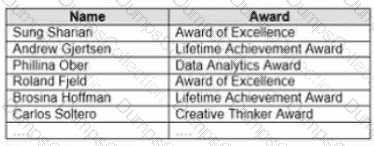
Which formula should you use to get the number of different types of awards that have been won?
A Data Analyst loads a dataset from Microsoft Excel. The following is a sample of the data.
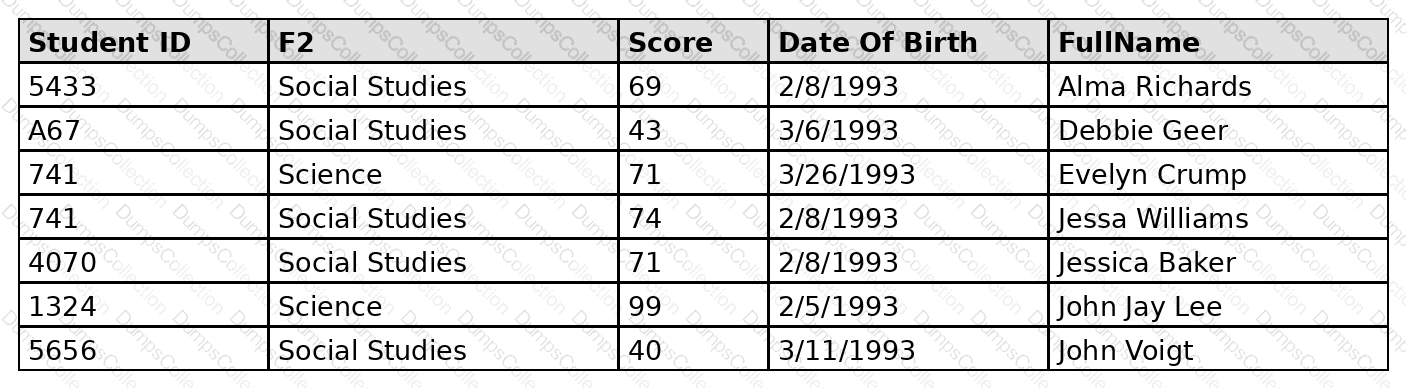
FullName contains student names. Some names contain a first name and a last name. Some names contain a first name, a middle name, and a last name.
The analyst needs to divide FullName into three separate fields: one for the first name, one for the middle name, and one for the last name. The solution must minimize effort for the analyst.
What should the analyst do?
When a Data Analyst needs to format workbook settings, which options are available in the Format Workbook panel?
You have the Mowing dashboard.
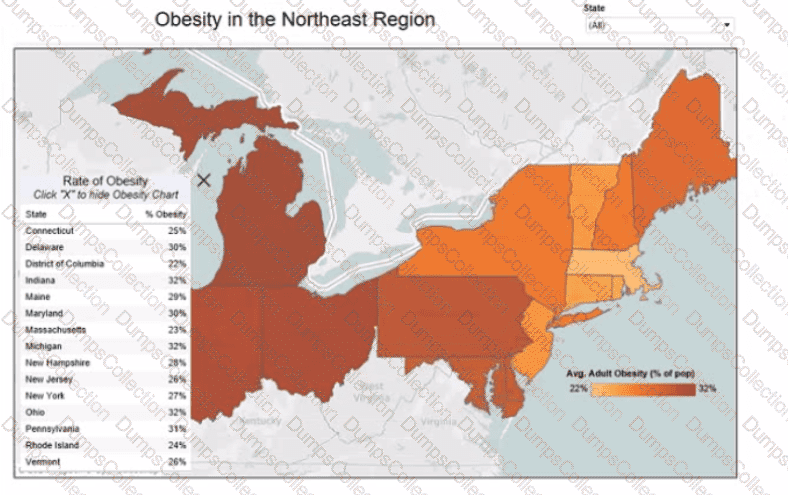
Which two elements are floating? Choose two.
A Data Analyst has two tables named EmployeeInfo and DepartmentInfo. EmployeeInfo contains four fields named Full Name, Department ID, Start Date, and Salary. DepartmentInfo contains four fields named Department Name, Size, Department ID, and VP. The analyst wants to combine the tables to meet the following requirements:
EmployeeInfo is the first table that is dragged to the canvas,
The records must contain the Full Name, and the Department Name, Size, and VP fields if available,
Not all records have an exact match.
Which type of join should the analyst use?
You have the following:
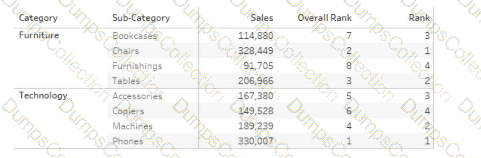
Overall Rank and Rank are calculated fields that use the RANK function.
You filter out the sub-category where [Ovorall Rank] - 1.
For which three the sub-categories will the value of Rank change? Choose three.
A Data Analyst is creating a map that includes multiple data layers at country, state, and city levels. Users want to customize their map by turning layers on and off as needed.
How should the analyst provide this functionality?

TESTED 12 Oct 2026