
What is the limitation when assigning ISUs to integration systems?
Refer to the following scenario to answer the question below.
An external system needs a file containing data for recent worker job changes. They would like to receive a file routinely at 5:00 PM Eastern Standard Time, every 48 hours. The file should show job changes since the last integration run.
What is the recurrence type of the integration schedule?
Refer to the following scenario to answer the question below.
You are configuring a Core Connector: Worker integration to send data to a new external compliance and certification tracking vendor. You have begun to configure the connector with the Data Initialization Service (DIS) enabled. Your goal is to extract worker qualification data, but the vendor has three specific requirements:
The file must only include Active workers who are in the “Clinical Staff” Job Family.
The vendor has specified that for each worker’s Education data, they only want to receive the Institution Name, Institution Type and Degree.
The vendor requires a custom “License ID” that must combine the Certification Name and Issuing State, for example, “RN-CA”. A Calculated Field that provides this custom “License ID” already exists in the tenant.
During testing, using a Full File run, the output file is missing all education-related information, even though you believe you have initially configured field attributes such as Institution Name, Institution Type and Degree in the Configure Integration Field Attributes step. Additionally, you confirmed that the Worker Qualification Data Section is marked as Include in Output.
What should you do to resolve this issue?
An external system needs a file containing data for total hours of overtime worked for each worker. They would like to receive a file at the end of each month. The file should show compensation changes since the last integration run.
What is the recurrence type of the integration schedule?
Refer to the following XML to answer the question below.
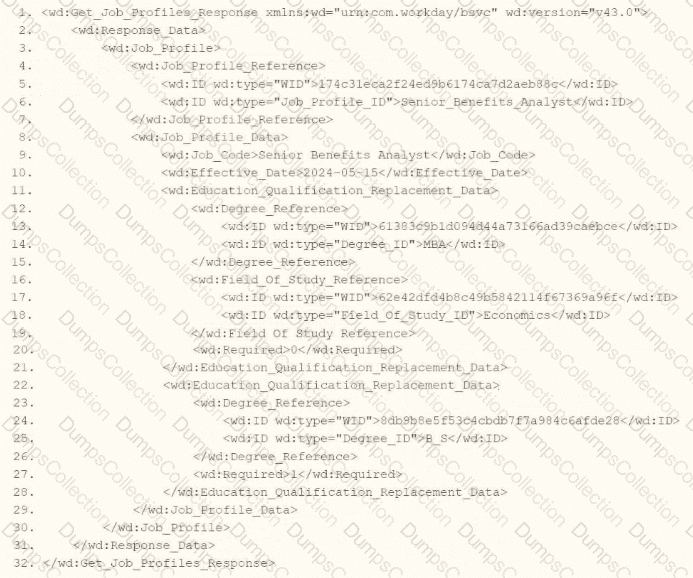
You are an integration developer and need to write XSLT to transform the output of an EIB which is making a request to the Get Job Profiles web service operation. The root template of your XSLT matches on the < wd:Get_Job_Profiles_Response > element. This root template then applies templates against < wd:Job_Profile > . What XPath syntax would be used to select the value of the ID element which has a wd:type attribute named Job_Profile_ID when the < xsl:value-of > element is placed within the template which matches on < wd:Job_Profile > ?
A vendor needs an EIB that uses a custom report to output a list of new hires and the date they are eligible for benefits. You have been asked to create a calculated field that adds each worker ' s hire date + 85 days and displays the result in YYYY-MM-DD format.
Which calculated field functions do you need to accomplish this?
How many integration systems can an ISU be assigned to concurrently?
A vendor needs an EIB that uses a custom report to output a list of new hires and their child dependent(s). You have been asked to create a calculated field that will be used to add only child dependent(s).
Which calculated field functions do you need to accomplish this?
Refer to the following scenario to answer the question below.
You need to configure a Core Connector: Candidate Outbound integration for your vendor. The connector requires the data initialization service (DIS).
The vendor needs a value on the output file which contains the average number of jobs a candidate applied to. This value is not delivered by Workday so you have identified that you will need to build a calculated field to generate this value.
What steps do you follow to output the calculated field?
Which features must all XSLT files contain to be considered valid?

TESTED 23 Sep 2026