
Pre-Summer Special Sale - 70% Discount Offer - Ends in 0d 00h 00m 00s - Coupon code: best70

Page: 1 / 2
Total 16 questions
Exam Code: Workday-Pro-Time-Tracking                Update: Apr 27, 2026
Exam Name: Workday ProTime Tracking Exam

Workday Workday ProTime Tracking Exam Workday-Pro-Time-Tracking Exam Dumps: Updated Questions & Answers (April 2026)

Question # 1

Refer to the following scenario to answer the question below.
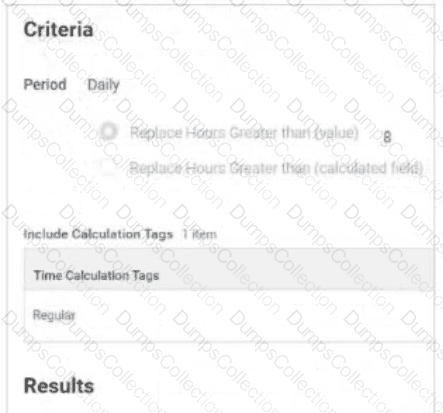

Table is labeled Include Calculation Tags 1 Item

    The Time Calculation Tag included is Regular.

Results:

    Add Tags field includes Daily Overtime.

    Remove Tags field is empty.

    Time Day Based On field selection is Calculated Date

The Daily Overtime calculation is tagging hours with both the Regular and Daily Overtime tags. This calculation should only tag hours with the Daily Overtime tag.

What should you edit in the calculation?

A.

Add Tags

B.

Period

C.

Include Calculation Tags

D.

Remove Tags

Question # 2

When using the auto-fill options on the time entry template, what will Workday do?

A.

Delete existing time blocks with time off entries for the current week.

B.

Overwrite existing time blocks containing the default time entry code.

C.

Delete existing time blocks with time off entries for the following week.

D.

Overwrite existing time blocks with time off entries.

Question # 3

You have configured a Time Calculation that tags all hours reported on either Saturday or Sunday as Weekend Premium hours. A second time calculation tags all hours worked over 8 hours on Saturday or Sunday as double time.

What task do you use to verify that these two time calculations are prioritized correctly?

A.

View Time Calculation Group

B.

Maintain Time Calculation Tags

C.

Maintain Time Accumulator Threshold Rule Priorities

D.

Maintain Time Calculation Priorities

Question # 4

What report do you run to ensure that a period schedule is assigned to a worker?

A.

Audit - Workers with Multiple Time Period Schedules

B.

Time Entry Period Schedule Review

C.

View Period Schedule

D.

View Worker’s Time Eligibility

Question # 5

Refer to the following scenario to answer the question below.
You have received a requirement to create a set of Time Tracking Components for workers who have the following attributes:

    Time Type = Salary

    Country = United States

    Supervisory Organization = Facilities Group

You want to create a single Time Tracking Eligibility Rule for all new configuration components.

What business object must you use when selecting fields for the conditions?

A.

Compensation

B.

Position

C.

Organization

D.

Worker

Question # 6

You have configured a Time Calculation Tag to tag all hours worked on the seventh consecutive day.

Where will these hours display in the Worker’s Time Entry Calendar?

A.

On the day’s shift in the Worker’s Work Schedule Calendar.

B.

On the Calculated tab in the Time Block in the Worker’s Time Entry Calendar on the day the hours were worked.

C.

In the Calculation Group Snapshots for the worker on the View Worker’s Time Eligibility report.

D.

On the top line of the Time Block in the Worker’s Time Entry Calendar on the day the hours were worked.

Question # 7

Refer to the following scenario to answer the question below.
You are reviewing time for a worker in California. The worker has reported hours for the seventh consecutive day and the hours are calculating as configured. This week the worker reported 11 hours on the seventh consecutive day worked. This worker is eligible for double time on all hours worked over 8 on the seventh consecutive day; however, all 11 hours are tagged as seventh consecutive day hours.

While reviewing the Seventh Consecutive Day Double Time calculation, you notice there are two time calculation tags sharing the same row in the grid.

What does this signify?

A.

An AND condition is applied to the time calculation tags. Only hours that contain both calculation tags will be counted towards the 8 hour threshold.

B.

An OR condition is applied to the time calculation tags. Hours that contain either of the calculation tags will be counted towards the 8 hour threshold.

C.

If the SUM of hours worked with either of the two time calculation tags equals or exceeds the number of hours in the criteria, then the time calculation will be triggered.

D.

If the SUM of hours worked with either of the two time calculation tags equals but does not exceed the number of hours in the criteria, then the time calculation will be triggered.

Question # 8

What is the recommended sequence that time calculations should be processed?

A.

Double-time calculations should be prioritized before overtime calculations.

B.

Monthly overtime calculations should be prioritized first.

C.

Calculations using Worktags should be prioritized after all overtime calculations.

D.

Weekly overtime calculations should be processed before daily overtime calculations.

Question # 9

You need to track regular hours and callback time. How will you configure the Callback time entry code so it is only used for time calculations referencing Callback tags?

A.

Callback must be configured as a separate time entry code with the default Calculation Tag field blank.

B.

Callback must be configured as a temporary Time Calculation tag.

C.

Callback should not be configured as a time entry code.

D.

Callback must be configured on the Advanced tab on the time entry code.

Question # 10

Refer to the following scenario to answer the question below.

Amanda Baker is eligible for the following calculations: Daily OT > 8 regular hours in a day, Daily double time > 12 regular hours in a day, Weekly OT > 40 regular hours in a week.

How many time calculation tags are assigned on the calculated tab for Tuesday?

A.

1

B.

2

C.

3

D.

4

Page: 1 / 2
Total 16 questions

Most Popular Certification Exams

Payment


Contact us

Site Secure

mcafee secure

TESTED 27 Apr 2026